A WooCommerce loyalty program gives customers a reason to choose your store again instead of searching for the next deal. Points on every order, vouchers they can spend in the cart and a referral link to share turn a single purchase into a habit. This guide walks through setting one up from scratch, step by step, using Smart Loyalty, a loyalty plugin that runs entirely inside WooCommerce.
What is a WooCommerce loyalty program?
A loyalty program rewards customers for the actions you want more of: buying, buying again, spending more, leaving reviews and bringing friends. In WooCommerce that usually means a plugin that:
- awards points automatically when an order is paid
- lets customers turn points into discounts
- adds extras such as referral rewards, birthday bonuses and VIP levels
- shows customers their balance in My Account and at checkout
Because it runs inside your store, there is no separate app for customers to install and no monthly SaaS fee, and your customer data stays with you.
Before you start
Check that your store meets the requirements: WordPress 6.6 or newer, WooCommerce 8.3 or newer and PHP 8.2 or newer. If you haven’t installed WooCommerce yet, get it free from the official WooCommerce plugin page on WordPress.org.
Decide two things up front: roughly how much you want to give back per order, and what customers can spend their points on.
Step 1: Install and activate the loyalty plugin
Download the plugin zip from your receipt email. In WP Admin go to Plugins › Add New › Upload Plugin, choose the zip, click Install Now and then Activate. Open Loyalty in the admin menu, enter your licence key and click Activate License. A setup wizard then walks you through points, vouchers and bonuses.
If your PHP or WooCommerce version is too old, the plugin shows a notice and stays inactive, so it can’t break your store.
Step 2: Decide how customers earn loyalty points
Under Loyalty › Earning, set a base rate, for example 10 points for every $1 spent. That one number covers every product in your store.
Then override it where it makes sense. You can set points per product, per category and per variation, which is useful for giving extra points on high-margin items or fewer on products that are already discounted.
How many points should you give?
Think about what a point is worth when it is redeemed. With the example settings in this guide (10 points per $1, and 500 points for a $5 voucher), each point is worth 1 cent, so customers get back 10 cents per dollar, or 10%. That is generous. You may prefer to start lower, for example 1 or 2 points per $1, and run double-points promotions when you want a boost. It is easier to add value later than to take it away.
Step 3: Add earning rules for bigger orders
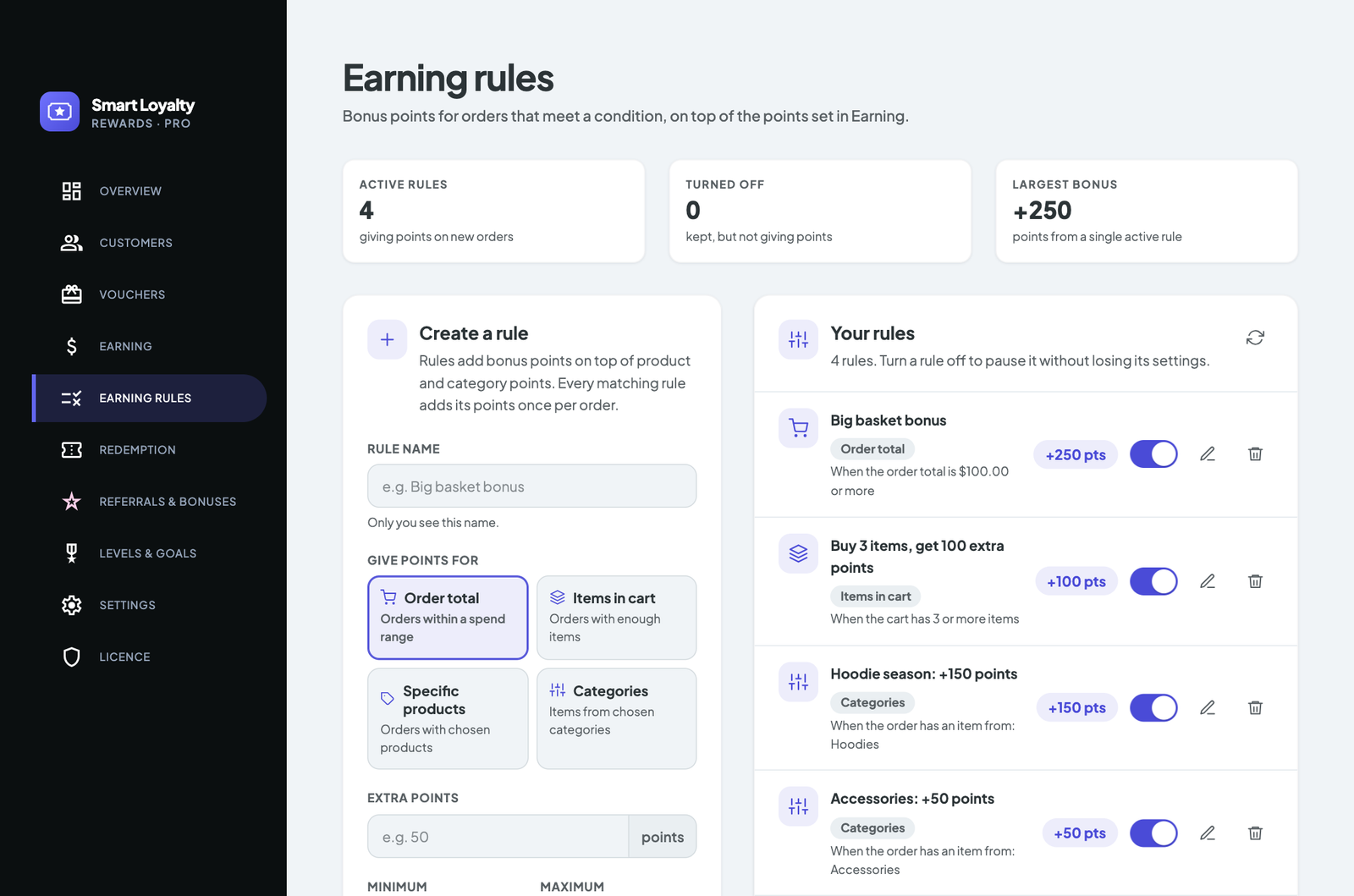
Earning rules add bonuses on top of the base rate. Three types cover most stores:
- Order total: for example 250 points for orders over $100
- Items in cart: for example 100 points for 3 or more items
- Product or category: extra points when certain products are bought, handy when you launch a new range
Points stay pending until the order reaches the status you choose (Completed by default), and they are taken back in proportion to refunds, so customers can’t earn on orders they return.
Step 4: Turn points into vouchers customers can actually use
Points only work if they are easy to spend. Under Loyalty › Redemption, set the reward tiers customers can choose from, such as 500 points for $5 off. You can also set an expiry, the number of uses, a minimum spend and a daily limit.
Customers redeem from My Account › Vouchers or straight from the Pay with points panel in the cart and checkout, which creates the voucher and applies it in one step. It works with both the classic and the block Cart and Checkout.
Step 5: Add bonuses for more than purchases
Under Loyalty › Referrals & bonuses you can reward actions that build the relationship between orders:
- signing up for an account
- daily check-ins
- completing their profile
- verified product reviews
- birthdays
Each bonus has its own amount. Set one to 0 to turn it off.
Step 6: Launch a referral program
Word of mouth is one of the cheapest ways to win new customers. Every customer gets a personal share link in My Account › Refer a friend. You choose first-click or last-click attribution and how many days a link is remembered.
The referrer is rewarded once per new customer, after that customer’s first paid order and once the pending period ends. Self-referrals and refunded orders are never rewarded, and you can cap sign-ups per IP and rewards per 30 days.
Step 7: Add levels and badges for your best customers
Levels give regulars something to aim for. Under Loyalty › Levels & goals, create levels such as Bronze, Silver and Gold, each with the lifetime points it needs and an optional badge image. Spending points never lowers a customer’s level, so redeeming never feels like a penalty.
Show customers their points
A loyalty program customers can’t see won’t change what they do. Put balances where shoppers already look:
[slw_points]shows a customer’s balance and level[slw_history]shows their points history[slw_referral]shows their referral link- the Points balance and Leaderboard widgets (customers opt in to the leaderboard from My Account)
Points also appear on product pages, in the cart and at checkout, so customers see what they will earn before they pay.
Common mistakes to avoid
- Rewards that are too hard to reach. If the first voucher takes a year to earn, most customers will forget about it.
- Hiding the program. Mention it on product pages, in order emails and in My Account.
- Rewarding refunds. Keep points pending until orders are completed.
- Letting referrals be gamed. Use the built-in limits for self-referrals and sign-ups per IP.
Next steps
A WooCommerce loyalty program doesn’t need to be complicated to work. Start with points on every order and one easy voucher, then add referrals, bonuses and levels as you learn what your customers respond to. For more ideas, read 8 WooCommerce points and rewards ideas that bring customers back.
See everything Smart Loyalty can do on the features page, follow the full setup in the documentation, or compare plans: one payment, no monthly fees.